
RADIX FC Spare Parts Kit
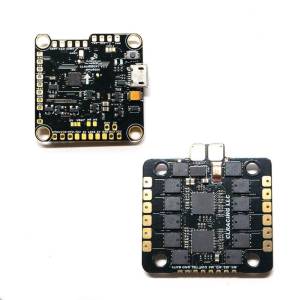
Keep your build clean and ensure perfect compatibility with the BrainFPV RADIX Spare Parts & Cable Kit. This essential kit provides everything you need to create custom wiring harnesses for connecting your RADIX flight controller to nearly any ESC on the market, whether it’s a 4-in-1 or individual ESCs. It’s the official solution for a professional and reliable build.
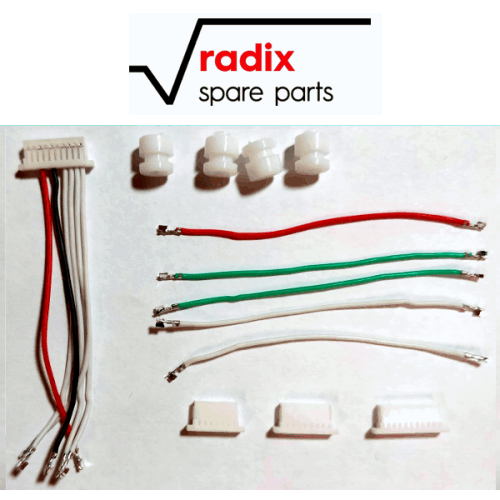
Build the Perfect ESC Cable. Different ESCs use different pin counts and wire arrangements. This kit gives you the flexibility to create the exact cable you need. It starts with a pre-wired 10-pin JST-SH connector harness and includes spare crimped cables and additional 7-pin, 8-pin, and 10-pin JST-SH housings. This allows you to easily re-pin the connector or build a completely custom harness to match your specific ESC, ensuring a clean, plug-and-play connection.
Genuine BrainFPV Quality: This kit includes genuine BrainFPV components, guaranteeing a perfect fit and reliable connection with your RADIX flight controller. It also includes a set of four M3 silicone anti-vibration grommets, essential for isolating your flight controller from frame vibrations for the smoothest possible flight performance.
Key Features:
- Official BrainFPV Parts: Ensures perfect compatibility and quality for your RADIX FC.
- Build Custom ESC Cables: Includes various JST-SH housings and spare wires to create harnesses for almost any ESC.
- Pre-Wired Harness Included: Starts you off with a standard 10-pin harness ready for modification.
- Includes Anti-Vibration Grommets: Provides essential vibration damping for your flight controller stack.
Specifications
- Brand: BrainFPV
- Compatibility: RADIX Flight Controllers
- Connectors: JST-SH (7-pin, 8-pin, 10-pin housings included)
Includes:
- 1x 10-pin JST-SH connector WITH 50mm long CABLES INSERTED
- 1x Set of Spare Crimped Cables (White x2, Green x3, Red x1 – 50mm long)
- 1x 7-pin JST-SH Connector Housing
- 1x 8-pin JST-SH Connector Housing
- 1x 10-pin JST-SH Connector Housing
- 4x M3 Silicone Grommets
Use the MyFPVStore OSD – https://www.brainfpv.com/blog/osdlogo/myfpvstore/